Binary Tree Traversal

Binary Tree Traversal
A binary tree is a tree data structure in which each nod has at most two children, referred to as the left child and the right child. The tree starts for the root node, and each node can have zero, one, or two child nodes. Each node, except the root, has one parent node.
The concept of a binary tree can be visualized as follows:
- Each node in the tree contains some data (a value or a key) and two pointers/references to its left and right children, or null if the child doesn't exist.
- The topmost node is called the root of the tree.
- Nodes with no children are called leaf nodes or external nodes.
- Nodes with at least one child are called internal nodes.
- The maximum number of nodes at any level
Lin a binary tree is2^(L-1), starting from the level 1 (root level) at the top. - The maximum number of nodes in a binary tree of height
His2^(H-1). - The height (or depth) of a binary tree is the length of the longest path from the root node to the leaf node.
Binary trees are commonly used in many applications, such as representing hierarchical data structures, organizing data for efficient searching and sorting algorithms, and implementing binary search trees, heaps, and expression trees. They play a fundamental role in computer science and data structures.
Determine Traversal Orders
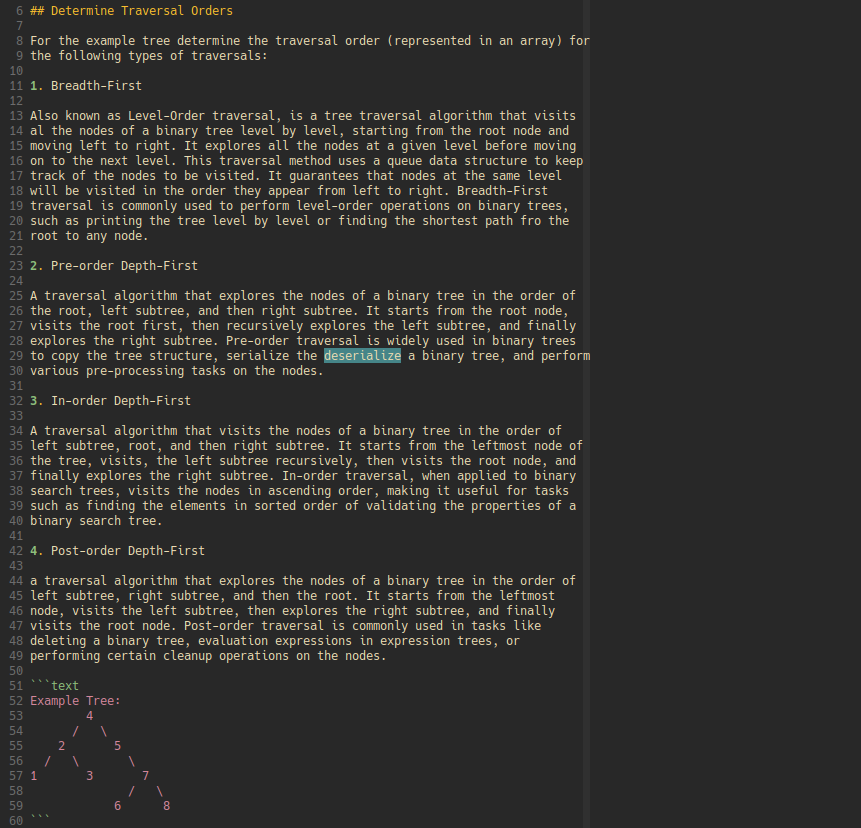
For the example tree determine the traversal order (represented in an array) for the following types of traversals:
- Breadth-First
Also known as Level-Order traversal, is a tree traversal algorithm that visits al the nodes of a binary tree level by level, starting from the root node and moving left to right. It explores all the nodes at a given level before moving on to the next level. This traversal method uses a queue data structure to keep track of the nodes to be visited. It guarantees that nodes at the same level will be visited in the order they appear from left to right. Breadth-First traversal is commonly used to perform level-order operations on binary trees, such as printing the tree level by level or finding the shortest path fro the root to any node.
- Pre-order Depth-First
A traversal algorithm that explores the nodes of a binary tree in the order of the root, left subtree, and then right subtree. It starts from the root node, visits the root first, then recursively explores the left subtree, and finally explores the right subtree. Pre-order traversal is widely used in binary trees to copy the tree structure, serialize the deserialize a binary tree, and perform various pre-processing tasks on the nodes.
- In-order Depth-First
A traversal algorithm that visits the nodes of a binary tree in the order of left subtree, root, and then right subtree. It starts from the leftmost node of the tree, visits, the left subtree recursively, then visits the root node, and finally explores the right subtree. In-order traversal, when applied to binary search trees, visits the nodes in ascending order, making it useful for tasks such as finding the elements in sorted order of validating the properties of a binary search tree.
- Post-order Depth-First
a traversal algorithm that explores the nodes of a binary tree in the order of left subtree, right subtree, and then the root. It starts from the leftmost node, visits the left subtree, then explores the right subtree, and finally visits the root node. Post-order traversal is commonly used in tasks like deleting a binary tree, evaluation expressions in expression trees, or performing certain cleanup operations on the nodes.
Example Tree:
        4
      /   \
    2       5
  /   \       \
1       3       7
              /   \
            6      8
The tree is going to be made up of a few pieces. Each section of the tree will have a node. Inside of each node there will be some extra data.
- val
- left
- right
    [5]
  /    \
[2]     [7]

val: 5
|
left: val: 2
|     left: null
|     right: null
|
right: val: 7
       left: null
       right: null
When we diagram the trees out we won't worry about putting the null values at
the bottom of the diagrams. This is just expected so you should also expect that
as well.
Example Tree:
        4
      /   \
    2      5
  /   \       \
1       3       7
              /   \
            6      8
I would let to set us up to use JavaScript, but I'd like to use two different ways. First will be the function setup and the second will be a class setup.
Binary Tree in array form
const binaryTreeArray = [4, 2, 5, 1, 3, null, 7, null, null, null, null, 6, 8];Function
function TreeNode(val) {
  this.val = val;
  this.left = null;
  this.right = null;
}

function deserialize(arr) {
  if (arr.length === 0) { return null; }
  let root = new TreeNode(arr[0]);
  let queue = [root];
  for(let i = 1; i < arr.length; i += 2) {
    let current = queue.shift();
    if (arr[i] !== null) {
      current.left = new TreeNode(arr[i]);
      queue.push(current.left);
    }
    if (arr[i + 1] !== null && arr[i + 1] !== undefined) {
      current.right = new TreeNode(arr[i + 1]);
      queue.push(current.right);
    }
  }
  return root;
}
const root = deserialize(binaryTreeArray);
Class
class TreeNode {
  constructor(val) {
    this.val = val;
    this.left = null;
    this.right = null;
  }
}

class BinaryTree {
  constructor() {
    this.root = null;
  }

  deserialize(arr) {
    if (arr.length === 0) return null;

    this.root = new TreeNode(arr[0]);
    const queue = [this.root];

    for (let i = 1; i < arr.length; i += 2) {
      const current = queue.shift();

      if (arr[i] !== null) {
        current.left = new TreeNode(arr[i]);
        queue.push(current.left);
      }

      if (arr[i + 1] !== null && arr[i + 1] !== undefined) {
        current.right = new TreeNode(arr[i + 1]);
        queue.push(current.right);
      }
    }
  }
}

const tree = new BinaryTree();
tree.deserialize(binaryTreeArray);
Now we have a basic setup for our tree example. Now we can move into how we will traverse this structures based on the examples above.
Breadth-First
- Expected Result: [4, 2, 5, 1, 3, 7, 6, 8]
const tree_bfs = (root) => {
  const result = [];
  const queue = [];

  if (root === null) return result;
  queue.push(root);

  while (queue.length !== 0) {
    const current = queue.shift();
    result.push(current.val);
    if (current.left !== null) queue.push(current.left);
    if (current.right !== null) queue.push(current.right);
  }
  return result;
};

const test_tree_bfs = tree_bfs(tree.root);
console.table(test_tree_bfs);
Result:
┌─────────┬────────┐
│ (index) │ Values │
├─────────┼────────┤
│    0    │   4    │
│    1    │   2    │
│    2    │   5    │
│    3    │   1    │
│    4    │   3    │
│    5    │   7    │
│    6    │   6    │
│    7    │   8    │
└─────────┴────────┘
Pre-order Depth-First
-
Action
-
Left
-
Right
-
Expected Result: [4, 2, 1, 3, 5, 7, 6, 8]
const preorder_DFS = (root) => {
  const result = [];

  const traverse = (current) => {
    if (current === null) return;
    // action
    result.push(current.val);
    // left traversal
    traverse(current.left);
    // right traversal
    traverse(current.right);
  }
  traverse(root);
  return result;
};

const test_preDFS = preorder_DFS(tree.root);
console.table(test_preorder_DFS);
Result:
┌─────────┬────────┐
│ (index) │ Values │
├─────────┼────────┤
│    0    │   4    │
│    1    │   2    │
│    2    │   1    │
│    3    │   3    │
│    4    │   5    │
│    5    │   7    │
│    6    │   6    │
│    7    │   8    │
└─────────┴────────┘
In-order Depth-First
-
Left
-
Action
-
Right
-
Expected Result: [1, 2, 3, 4, 5, 6, 7, 8]
const inorder_DFS = (root) => {
  const result = [];

  const traverse = (current) => {
    if (current === null) return;
    // left traversal
    traverse(current.left);
    // action
    result.push(current.val);
    // right traversal
    traverse(current.right);
  }
  traverse(root);
  return result;
};

const test_inorder_DFS = inorder_DFS(tree.root);
console.table(test_inorder_DFS);
Result:
┌─────────┬────────┐
│ (index) │ Values │
├─────────┼────────┤
│    0    │   1    │
│    1    │   2    │
│    2    │   3    │
│    3    │   4    │
│    4    │   5    │
│    5    │   6    │
│    6    │   7    │
│    7    │   8    │
└─────────┴────────┘
Post-order Depth-First
-
Left
-
Right
-
Action
-
Expected Result: [1, 3, 2, 6, 8, 7, 5, 4]
const postorder_DFS = (root) => {
  const result = [];

  const traverse = (current) => {
    if (current === null) return;
    // left traversal
    traverse(current.left);
    // right traversal
    traverse(current.right);
    // action
    result.push(current.val);
  }
  traverse(root);
  return result;
};

const test_postorder_DFS = postorder_DFS(tree.root);
console.table(test_postorder_DFS);
Result:
┌─────────┬────────┐
│ (index) │ Values │
├─────────┼────────┤
│    0    │   1    │
│    1    │   3    │
│    2    │   2    │
│    3    │   6    │
│    4    │   8    │
│    5    │   7    │
│    6    │   5    │
│    7    │   4    │
└─────────┴────────┘
I hope you understand how to setup and traverse a binary tree. If you have a stack that won't be able to handle the tree depth. You may need to use a pattern that does not use recursion. For right now we will just leave it as a recursive solutions for the DFS. The time you would use iterative is when the stack is too big and requires too many calls.
How about adding some depth information?
const preDFS = (root) => {
  const result = [];
  let max_depth = -1;

  const traverse = (current, depth) => {
    if (current === null) return;
    // action
    result.push(current.val);
    max_depth = Math.max(max_depth, depth);
    // left traversal
    traverse(current.left, depth + 1);
    // right traversal
    traverse(current.right, depth + 1);
  }
  traverse(root, 0);
  console.log(max_depth);
  return result;
};
Result:
3